
In this article, you will learn how to embed videos on your website without slowing the page down or violating data protection rules. It also covers copyright, subtitles and AI tools that save you work. As of November 2026.
Embedded correctly, videos do not overload a website. They make it more vivid, and visitors stay longer. A good image or product video shows in one minute what a company stands for. Classic advertising, on the other hand, is often tuned out.

Good videos build trust
A good promotional or image film does not force anything on the viewer. On the contrary, it offers the viewer something. Good videos are entertaining, funny, informative, inspiring and atmospheric – ideally all at once. In videos, you see people you can identify with and who build trust. A good image film gives a direct insight into a company without the viewer having to do anything for it. In this way, you can present openly and transparently what you and your company stand for.
Unlike traditional TV or radio advertising, online videos have a decisive advantage: users share, recommend and forward them. They are therefore not forced on further recipients but watched voluntarily and on recommendation. As a result, they work like classic referral marketing and are correspondingly more trustworthy and effective. So embed really appealing, funny or exciting videos on your website. If they are then recommended, your website and ultimately your whole company benefit from this trust bonus.
The importance of video continues to grow
Anyone looking for information about a product or a company often searches for a video first. Many people use YouTube as a search engine for instructions, tests and explanations. If you do not have a video there yet, you are missing the chance to make a likeable first impression.
Video has also become a matter of course in everyday working life: video conferences, live streams of events and short introduction videos of employees are part of many companies. An introduction video on the “About us” page gives your company a face.
On social networks, short vertical videos dominate: Reels on Instagram, Shorts on YouTube as well as clips on TikTok and LinkedIn. Therefore, plan during the shoot that several formats will be created from one film.
Better visibility: embed videos on your website and mark them up correctly
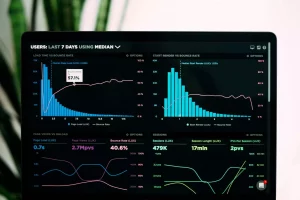
Videos can have a positive effect on visibility on Google. However, this is not guaranteed. Three things help:
- The video is on a page that matches the topic and is clearly visible there.
- Title, description and thumbnail are well maintained. Structured data of the type VideoObject makes it easier for Google to classify the video.
- The page loads quickly, also on smartphones.
In addition, anyone who watches a video usually stays on the page longer and understands the offer better. This pays off in enquiries, even if it is not a direct ranking factor.
What does “embedding videos” mean?
Embedding videos on your own website does not mean downloading the videos and uploading them to your own site. It means integrating a link or embed code of the video into your own website. Visitors see the start image and can play the video directly on your page without visiting YouTube or Vimeo. The video is not copied but streamed from the original source. Legally, exactly this makes the difference.
Are you allowed to embed other people’s videos on your website?
The following refers to the legal situation in Germany and the EU. From a legal point of view, embedding other people’s videos on your own website – also called “framing” – does not constitute a copyright infringement. Legally, framing is treated similarly to linking, and links to publicly accessible websites are known not to be a copyright infringement either. The German Federal Court of Justice has ruled that a video may be embedded whenever it was legally uploaded to YouTube. In other words, if the video is publicly accessible on the internet and was uploaded there with the consent of the rights holder, it may also be embedded.
Nevertheless, it is advisable to always ask the rights holder or author of the video for permission before embedding it. Just because the video is online on YouTube does not mean that the rights holder has permitted the upload. It may well be that the YouTube channel does not belong to the rights holder. Again and again, videos are uploaded to YouTube without the consent or even the knowledge of the rights holder. In these cases, the upload is illegal, and so is embedding or framing the video (article in German).
In 2021, the European Court of Justice added: if the rights holder has taken technical protection measures against embedding, these must not be circumvented. This section does not replace legal advice.
How do I prevent my videos from being embedded on other websites?
There are good reasons for not wanting your own YouTube videos to be embedded on other websites. For example, a retailer may have uploaded a product video that a competitor then wants to use to decorate their own homepage. If you have uploaded the video publicly, you cannot legally prohibit embedding. However, you can restrict the embedding options in the settings of the respective video platform. How this works on YouTube is described here.
However, you should weigh this up. You may find the embedding of your own video on other websites annoying. Nevertheless, every embed gives your video and your channel a wider reach and more views. The embedding website therefore always indirectly promotes your own video.

Does embedding videos slow down my website?
An embedded player loads a lot of data even if nobody clicks play. Several YouTube or Vimeo players on one page make it noticeably slower. The solution is a thumbnail with click-to-play: at first, only a lightweight image loads. The actual player only starts when someone wants to watch the video. Google recommends this approach in its guidance on embedded content.
This is how to proceed:
- Create a separate thumbnail for each video, preferably in WebP format.
- Load the player only after the click, for example in an overlay.
- Do without autoplay with sound.
- Do not simply upload large video files to your own web space. Without streaming technology, they stutter on a weak connection.
We work the same way on this website: in the portfolio, you see thumbnails, and the video only starts after the click.
Embed YouTube or Vimeo videos on your website: step by step
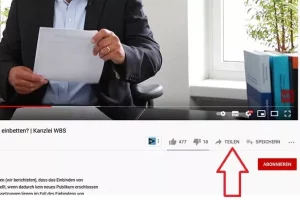
On YouTube, click “Share” below the video and then “Embed”. There you can also set a start time. Activate the option “Enable privacy-enhanced mode”. The video is then loaded via the address youtube-nocookie.com.
Important: according to many data protection experts in the EU, privacy-enhanced mode alone is not enough. Even when the player loads, data such as the IP address is transmitted to YouTube. Therefore, obtain consent beforehand. The two-click solution is common: visitors first see a thumbnail with a short notice. Only after the click is the connection to YouTube or Vimeo established. Consent tools such as Borlabs Cookie provide ready-made placeholders for this. In addition, update your privacy policy. This section does not replace legal advice either.
On Vimeo, you will find further settings under “Embed”, for example for title, profile picture and player colours. In WordPress, you paste the link to the video into a video block. As a rule, you do not need additional plugins for this.

Subtitles and accessibility: making videos accessible to everyone
Many people watch videos without sound, for example on the go. Subtitles are therefore always useful. For some offers, they are now mandatory: the German Accessibility Strengthening Act (Barrierefreiheitsstärkungsgesetz) has applied since 28 June 2025. It mainly affects online shops and other digital services for consumers. Check whether your offer is covered. Regardless of this, subtitles, a transcript and a player that can be operated with the keyboard help all visitors.
AI tools: subtitles, translations and short versions in minutes
Artificial intelligence saves you a lot of work before you embed videos on your website:
- Subtitles: editing programs such as Premiere Pro and DaVinci Resolve generate subtitles automatically from the spoken text.
- Translations: Premiere Pro translates subtitles into 27 languages. Nevertheless, have important versions proofread by a person.
- Transcript and description: with an AI assistant, the transcript quickly becomes an accompanying text for the page. This also helps search engines.
- Short versions: with AI support, vertical clips for social media can be derived from a long video.
Human review remains important. In addition, deceptively real AI images, AI voices or AI videos have had to be labelled as artificially generated since 2 August 2026 (Article 50 of the EU AI Act).
Quality is what counts
When creating and embedding videos, however, quality matters more than quantity. So do not just start filming and put your film online, because viewers infer the quality of the product or company from the quality of the video. A bad video is tiring and unpleasant to watch. As a rule, viewers will therefore not watch it to the end. In the worst case, they will even rate and comment on it negatively. In that case, embedding videos on the website has achieved exactly the opposite effect.
A video should always be well thought out, planned and professionally produced in order to leave a lasting, positive impression.
Make your website lively and varied
For even more variety, we recommend embedding photos and videos. It is important to make all articles on your website visually appealing and varied in content. Only then do you get the full reach and attention. Text passages that are too long seem overwhelming and put many readers off in advance.
In addition, products and services can be presented faster and in more detail in moving images than with text and pictures alone. These details and this variety make your website really appealing and ensure a pleasant user experience.
Would you like to have a video produced for your website? On the Video Production Düsseldorf page, you will find examples and prices.